
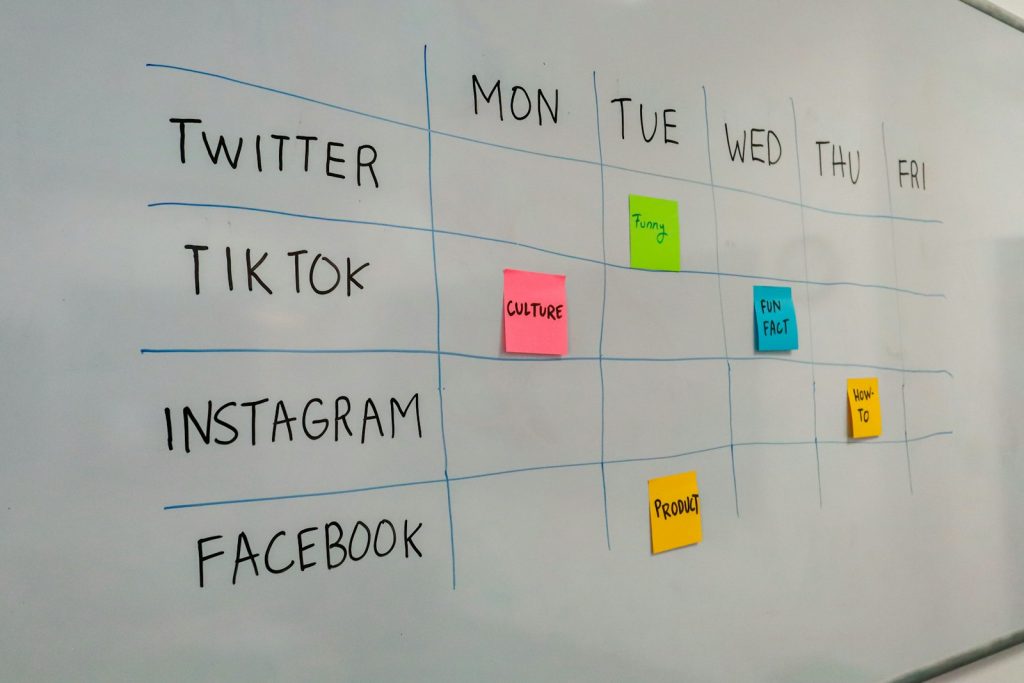
Most small businesses know they should be active on Facebook, Instagram, LinkedIn or TikTok – and most do not have the time or skill to do it well. Posts are irregular, designs look rushed, messages go unanswered and nobody knows what is working. A social media manager solves that. You plan content, create posts, publish consistently, engage with the audience and report results.
This guide shows you how to start a social media management service from home: the skills and tools, how to package services, how to find clients locally and internationally, how to run the monthly workflow and how to grow into a small agency.
Quick overview
- What it is: managing businesses’ social media presence for a monthly fee.
- Core skills: content planning, basic design, caption writing, community management, analytics and platform knowledge.
- Tools: Canva, Meta Business Suite, scheduling tools, Google Sheets or Notion.
- Clients: local businesses (restaurants, salons, clinics, coaching centres, shops) and international small businesses.
- Pricing: monthly packages based on platforms, posts and services.
- Growth path: freelancer → specialised service → small team or agency.
What social media management includes
| Service | Description |
|---|---|
| Strategy | Goals, audience, content pillars and posting plan |
| Content creation | Designs, short videos, captions and hashtags |
| Scheduling | Publishing at planned times |
| Community management | Replying to comments and messages (by agreement) |
| Analytics and reporting | Tracking reach, engagement, clicks and leads |
| Advertising (optional) | Running paid campaigns – requires separate skills |
Who this suits
People who enjoy creativity and communication, understand how businesses sell, are organised with calendars and deadlines, and can learn basic design and video editing.
What you need
- A laptop and smartphone.
- Canva (free or Pro) and a basic video editing app.
- Meta Business Suite (free) for Facebook and Instagram.
- A planning tool: Google Sheets, Notion or Trello.
- A portfolio with sample content calendars and posts.
- Contracts and invoice templates.
Step-by-step: starting the service
Step 1: Build the skills (4-8 weeks)
- Take free courses on social media marketing from reputable providers such as HubSpot Academy and Meta Blueprint.
- Learn each platform’s formats: posts, carousels, stories, reels.
- Practise design in Canva and short video editing.
- Learn to read platform insights.
See the digital marketing skills roadmap.
Step 2: Choose a niche
Pick an industry you understand: restaurants, beauty salons, clinics, education, real estate, fashion or e-commerce. Niche expertise makes your content better and your marketing easier.
Step 3: Create a sample portfolio
Invent two or three brands in your niche (or help a real small business with permission). For each, create:
- a one-page strategy (audience, goals, content pillars);
- a two-week content calendar;
- 9-12 sample posts and 2 short videos;
- a sample monthly report.
Read How to Build a Portfolio With No Experience.
Step 4: Design your packages
| Package | Example inclusions |
|---|---|
| Starter | 1 platform, 12 posts per month, captions, scheduling, monthly report |
| Growth | 2 platforms, 20 posts including 4 reels, basic community management, monthly report |
| Premium | 3 platforms, 30 posts including 8 reels, daily community management, strategy call, detailed report |
State clearly what is not included (for example, ad spend, professional photo shoots, influencer fees).
Step 5: Set your pricing
Research local and international rates. Local businesses often have smaller budgets; international clients may pay more but expect strong English and results. Price by value and workload, and always charge monthly in advance.
Step 6: Find your first clients
- Local outreach: visit or message businesses whose pages are inactive. Show them a quick improvement idea.
- Your network: friends and family who run businesses.
- Freelance marketplaces: Fiverr gigs for content packages; Upwork jobs for social media managers.
- LinkedIn: share tips and case studies for your niche.
Step 7: Onboard professionally
- Discovery call: goals, audience, brand voice, competitors.
- Access: ask to be added as a partner or admin through Meta Business Suite – never ask for personal passwords.
- Brand kit: logo, colours, fonts, photos.
- Approval process: how and when the client approves content.
The monthly workflow
| Week | Tasks |
|---|---|
| Week 1 | Plan next month’s calendar; send for approval |
| Week 2 | Create designs, videos and captions; batch-schedule |
| Weeks 3-4 | Monitor, engage, adjust; gather content ideas |
| Month end | Report: what worked, what did not, next month’s plan |
Tools
| Purpose | Tools |
|---|---|
| Design | Canva, basic photo editors |
| Video | CapCut, InShot or similar |
| Scheduling | Meta Business Suite; other schedulers with free plans |
| Planning | Google Sheets, Notion, Trello |
| Analytics | Platform insights; spreadsheet reports |
How you get paid
- Local clients: monthly advance payment via bank transfer, bKash or Nagad.
- International clients: via freelance marketplaces or invoices paid by international bank transfer.
Use a simple contract stating services, payment dates, notice periods and approval process. See our payments guide.
How to increase earnings
- Add paid advertising management once you learn it properly.
- Offer content shoots or reels production.
- Specialise deeply in one industry.
- Build templates and workflows to serve more clients efficiently.
- Hire a junior designer or assistant as you grow.
A worked example (hypothetical)
Tasnim notices three restaurants near her home in Chattogram post irregularly with low-quality photos. She creates a sample strategy for one restaurant and shows the owner a two-week plan with mock-ups. The owner agrees to a starter package paid monthly in advance. Tasnim photographs dishes in natural light, creates a mix of menu posts, behind-the-scenes reels and offers, and replies to comments within agreed hours. After two months, she shares a report showing more page messages. The owner refers her to a friend’s café – her second client.
Common mistakes
- Offering every platform and service to everyone.
- No written agreement about revisions and approval times.
- Posting without a strategy.
- Asking clients for personal login passwords.
- Promising specific follower numbers or sales.
- Ignoring analytics.
Risks and safety
- Account security: use business partner access and two-step verification.
- Scope creep: clients adding “just one more” task – handle with clear packages.
- Late payments: collect fees in advance.
- Reputation: avoid buying followers or engagement; it damages accounts.
Pros and cons
| Pros | Cons |
|---|---|
| Recurring monthly income | Constant content deadlines |
| High demand from small businesses | Clients may expect instant results |
| Creative, varied work | Platform algorithm changes |
| Can grow into an agency | Community management can extend work hours |
Realistic expectations
Many new social media managers start with one or two local clients at modest fees and grow through referrals and results. Income depends on your niche, client budgets, services and number of clients you can manage well. Building a stable client base often takes several months.
Your 30-day launch plan
| Days | Action |
|---|---|
| 1-7 | Learn platform basics; choose a niche |
| 8-15 | Create two sample brand portfolios |
| 16-20 | Design packages, contract and onboarding checklist |
| 21-30 | Contact 20 local businesses and publish a Fiverr gig or Upwork profile |
Key terms explained
- Content pillars: the main themes a brand posts about.
- Reach: how many unique people saw content.
- Engagement: likes, comments, shares and saves.
- Content calendar: a schedule of planned posts.
- Community management: responding to comments and messages.
Beginner tips
- Start with one platform you know best.
- Batch-create content weekly.
- Keep a swipe file of great posts in your niche.
- Send reports that explain results in plain language.
Advanced tips
- Learn paid ads for additional revenue.
- Build standard operating procedures to delegate work.
- Offer quarterly strategy reviews.
- Develop case studies with measurable results.
Frequently asked questions
Do I need a degree in marketing?
No. Skills, portfolio and results matter more. Free courses and practice can take you far.
How many clients can one person manage?
It depends on package size. Many solo managers handle a handful of clients comfortably.
Should I handle paid ads?
Only after learning properly. Poorly managed ads waste clients’ money.
How do I get access to a client’s Facebook page safely?
Ask the client to add you as a partner or admin through Meta Business Suite rather than sharing passwords.
Can I serve international clients from Bangladesh?
Yes, through freelance marketplaces or direct outreach, with strong English and relevant samples.
Final step
Choose your niche and create a sample content calendar for one imaginary business today. Next week, show it to a real business owner. For more ideas, explore our online business guides.